


Data integration is the process of combining data from databases, SaaS apps, files, APIs, and event streams into a consistent view that teams can use for analytics, AI, operations, and reporting.
Without it, every team works from a different version of the truth. Customer records stay in CRMs, transactions stay in production databases, and marketing metrics stay in ad platforms. Analysts spend more time reconciling data than using it.
This is why integration has become a core business priority. Global spending on data and analytics is projected to reach USD 134.6 billion in 2025 and USD 219.4 billion by 2029, according to IBM.
This guide is for data engineers, analytics leaders, and technical teams choosing how to move, unify, and operationalize data across modern systems. It covers what data integration is, why it matters, and how to choose the right approach across ETL, ELT, real-time CDC, streaming, replication, virtualization, and reverse ETL.
What is Data Integration?
Data integration is the process of combining data from multiple sources into a unified, consistent view that business applications, analysts, AI systems, and decision-makers can use. Gartner defines data integration as a discipline focused on meeting the data consumption requirements of applications and end users through tools, architectures, and best practices.
In practice, data integration brings together data from databases, SaaS applications, files, APIs, and event streams so it can be analyzed and used collectively. This integrated data is often stored in a central repository like a data warehouse or data lake, where it becomes available for reporting, analytics, AI workflows, and operational use cases.
The goal is to make data more accessible, consistent, and useful. Instead of manually pulling reports from dozens of systems, teams can query trusted integrated data and get a complete view of the business.
Why Data Integration Matters (Benefits & Importance)
Data integration isn’t just a technical exercise – it delivers tangible business benefits. Here are some of the key reasons why integrating data from across the enterprise is so important:
- Eliminating Data Silos: Integration breaks down isolated data pockets. Teams can access a 360° view of information instead of fragmentary, department-specific snapshots. This leads to more collaboration and ensures everyone is making decisions based on the same complete data, not conflicting versions.
- Improved Data Quality & Consistency: When data from multiple sources is consolidated, it can be cleaned and standardized in the process. This reduces inconsistencies and errors (like different IDs for the same customer). The result is higher data accuracy, which means reports and analyses are more trustworthy.
- Better Decision-Making: Unified data provides a holistic view of business performance, enabling deeper insights. According to IBM's 2025 CDO study, 82% of chief data officers say their organizations are wasting data if employees cannot access it for decision-making. Integrated data removes that barrier, giving analysts a complete picture to work from.
- Enhanced Efficiency & Productivity: Data integration automates the movement of data, saving countless hours of manual work. Rather than spending time exporting and reconciling spreadsheets from different systems, employees have instant access to consolidated data. This efficiency translates into cost savings and more time for value-added analysis.
- Comprehensive Customer Insights: Integrating customer-related data (sales, support tickets, web analytics, etc.) yields a complete customer profile. This Customer 360 view helps companies personalize marketing, improve service, and identify new sales opportunities. For instance, a support team can see a customer’s purchase history from an integrated dashboard, leading to better service.
- Improved Compliance and Governance: When data is integrated into one system, it is easier to enforce data governance policies uniformly. Only 26% of chief data officers are confident their data capabilities can support new AI initiatives, according to IBM's 2025 CDO study, largely because of governance gaps in fragmented data environments. Integration addresses this directly by centralizing control. Companies can apply consistent security measures, access controls, and retention rules across all data. Integration can thus help in complying with regulations (like GDPR or HIPAA) by centralizing audit tracking and data masking, rather than trying to manage compliance separately in each silo.
In short, data integration unlocks the full value of an organization’s data. By bringing everything together, it removes the blind spots and delays caused by fragmented systems. The business runs on consistent, up-to-date information, which is a foundation for competitive advantage in the digital age.
How the Data Integration Process Works
At its core, data integration moves and merges data through a structured pipeline. The traditional process, known as ETL (Extract, Transform, Load), typically follows these stages:
- Data Extraction: Data is pulled from source systems, which might include databases (like MySQL or Oracle), applications (CRM, ERP), files (CSV, JSON), APIs, or streaming platforms. Specialized connectors or listeners retrieve relevant data for the next step.
- Data Transformation: The extracted data is cleaned, standardized, and formatted to ensure consistency. This can include removing duplicates, aligning date formats, mapping codes to values, and applying business logic. The goal is to create harmonized datasets that are ready for analysis.
- Data Loading: Transformed data is then loaded into a centralized system—usually a data warehouse, lake, or other destination. This can occur in scheduled batches or continuously, depending on business needs.
- Continuous Synchronization: Modern pipelines often run continuously, capturing changes in source systems and updating targets in near real-time. This ongoing sync, sometimes powered by Change Data Capture (CDC), ensures data stays fresh. Integration platforms also log metadata, monitor for failures, and manage schema changes to keep pipelines reliable.
In essence, integration connects multiple systems into a unified source of truth. Whether using classic ETL or a modern real-time approach, the goal is the same: consistent, accurate, and accessible data across the organization.
Data Integration Architectures and Patterns
Your integration architecture plays a major role in how scalable, maintainable, and future-ready your data strategy is. Here are the core patterns and trends shaping modern integration design:
Point-to-Point vs. Centralized Hub
Point-to-point integration connects each source directly to each target. While simple at first, this model quickly becomes unmanageable as the number of systems grows. A better alternative is the hub-and-spoke architecture, where a central hub receives data from sources and routes it to destinations. This decouples systems, simplifies scaling, and allows centralized monitoring. Enterprise service buses (ESBs) and modern platforms often use this model.
Batch vs. Real-Time Integration
Batch processing moves data in chunks on a schedule—ideal for high-volume jobs where slight delays are acceptable (like nightly reporting). But it introduces latency and can't support instant insights. Real-time streaming, on the other hand, delivers data as events happen using technologies like Kafka or CDC. It powers use cases like live dashboards, real-time personalization, and instant fraud detection. As businesses become more data-driven, real-time integration is becoming the default expectation.
Learn more: Batch vs Real-time Integration
Modern Paradigms: Data Lakehouse, Fabric, and Mesh
New architectures offer more flexibility:
- Data Lakehouse combines warehouse and lake functionality, allowing structured and unstructured data in one system.
- Data Fabric creates a unified layer that connects distributed data sources across environments, using shared metadata and governance.
- Data Mesh decentralizes integration by assigning ownership of data pipelines to domain teams, enabling them to publish data as products.
These models support scalability, autonomy, and consistency across complex data ecosystems.
In practice, many organizations adopt hybrid architectures—for example, a hub-and-spoke platform that handles both batch jobs and real-time streams, feeding into a cloud lakehouse. The goal is to minimize complexity while enabling agility and real-time access as needs grow.
Data Integration Techniques and Methods

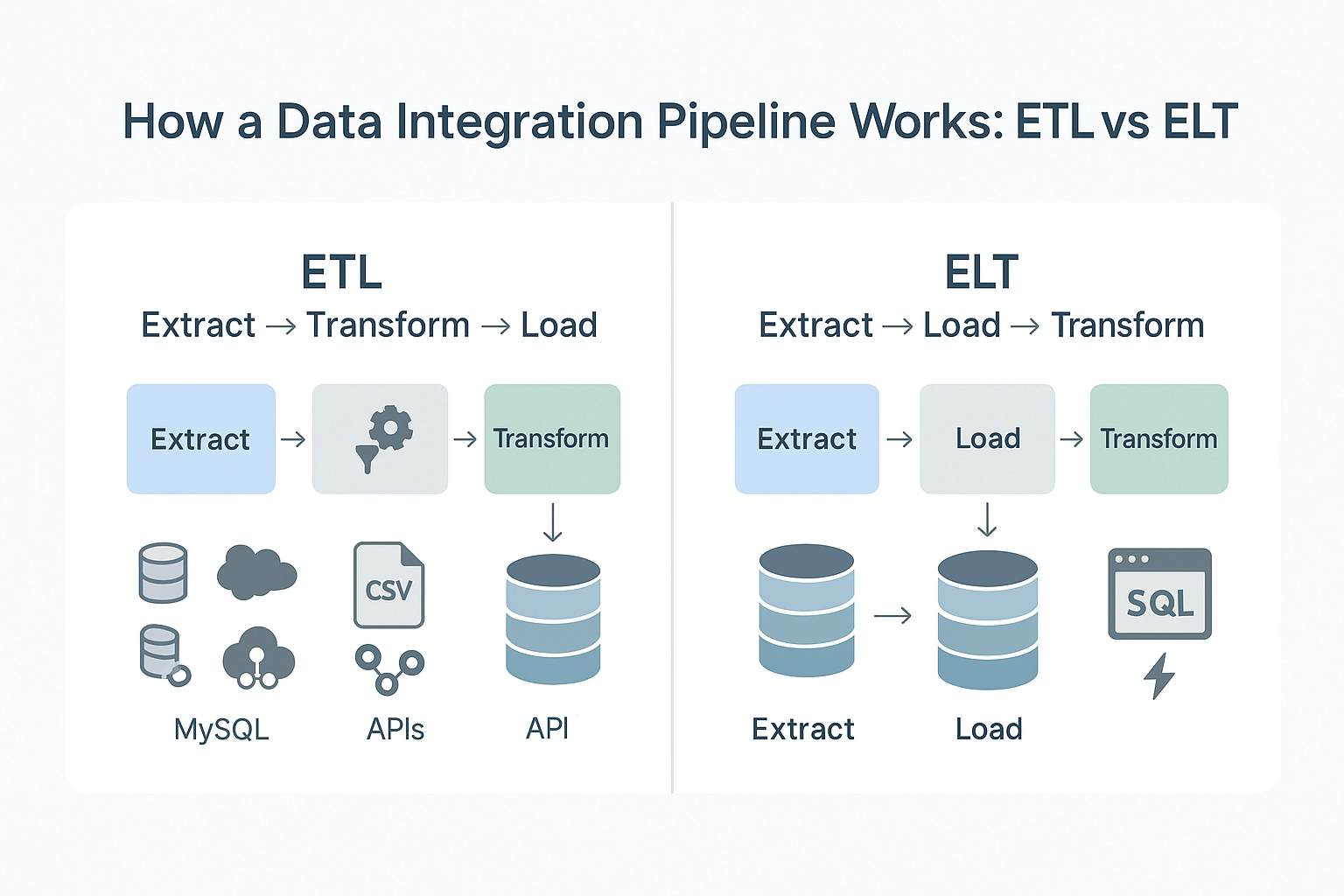
Data integration can be implemented using several core techniques. Each has its strengths and trade-offs depending on use case, data volume, latency needs, and infrastructure maturity.
| Method | Best for | Main tradeoff |
|---|---|---|
| ETL | Structured reporting pipelines where data needs to be cleaned before loading | Usually batch-based, so freshness is limited |
| ELT | Cloud data warehouses like Snowflake, BigQuery, and Redshift | Raw data lands first, so governance and transformation discipline matter |
| Real-time streaming and CDC | Low-latency analytics, replication, operational sync, and AI workflows | Requires stronger handling of ordering, retries, schema changes, and recovery |
| Data virtualization | Querying distributed data without physically moving it | Performance can suffer on large or complex queries |
| Data replication | Keeping systems synchronized with minimal transformation | Does not usually solve complex transformation or governance needs by itself |
| Reverse ETL | Sending warehouse data back to CRMs, marketing tools, and operational systems | Requires careful sync logic, identity mapping, and destination limits |
| API or middleware integration | Connecting SaaS apps and automating business workflows | API rate limits, authentication, and schema changes can add maintenance work |
1. ETL (Extract, Transform, Load)
ETL is the traditional integration approach. Data is extracted from source systems, transformed into a standardized structure on an intermediate server, and then loaded into a target like a data warehouse. It enforces strong data quality and is well-suited for reporting. But it’s typically batch-based, introducing latency that limits real-time usefulness. Common ETL tools include Informatica PowerCenter, Microsoft SSIS, and various cloud platforms.
2. ELT (Extract, Load, Transform)
ELT flips the transformation step: raw data is loaded into a target system first, then transformed using the compute power of the destination. It’s efficient for cloud-native architectures using tools like Snowflake, BigQuery, or Redshift. ELT simplifies ingestion and scales well for large datasets, but shifts transformation logic into the warehouse, which may complicate management.
Learn more about the differences in this detailed guide on data integration vs ETL.
3. Real-Time Streaming and CDC
For low-latency needs, real-time streaming is essential. Change Data Capture (CDC) monitors source systems for new or updated records and streams those changes instantly to targets. Combined with tools like Kafka or Pulsar, this enables real-time sync, live analytics, and fast decision-making. Streaming pipelines require careful handling of ordering, consistency, and failure recovery but are critical for time-sensitive workflows.
4. Data Virtualization and Federation
Instead of moving data, virtualization creates a unified query layer across sources. Users access real-time data without replication. It’s fast to implement and useful when duplicating data is impractical due to regulation or cost. However, performance can suffer when combining large datasets across distributed systems. Tools like Denodo and Dremio support this method.
5. Data Replication
Replication continuously copies data from one system to another, often with minimal transformation. It’s used for backups, creating read-only replicas, or syncing databases to analytical systems. Many platforms support CDC-based replication to keep replicas fresh while minimizing overhead on source systems.
6. Reverse ETL
Reverse ETL sends data from centralized stores like data warehouses back into operational tools (e.g., CRMs, support systems). It makes analytical insights actionable by putting data in the hands of frontline teams. Tools like Hightouch and Census automate this process by formatting and pushing curated datasets to SaaS tools.
7. API-Driven and Middleware-Based Integration
Modern cloud apps expose APIs to push or pull data. API-based integration supports near real-time syncing and event-driven workflows. Middleware or iPaaS tools simplify this by offering prebuilt connectors and orchestration capabilities. It’s ideal for operational use cases and syncing cloud tools but requires managing rate limits, authentication, and schema mapping.
Most organizations combine methods. For example, batch ETL handles historical data loads, while CDC and streaming cover real-time updates. Virtualization offers agility, and Reverse ETL bridges the gap between analytics and operations. The right mix depends on your latency requirements, data volume, infrastructure maturity, and business goals.
Modern Data Integration Tools and Platforms


The market for data integration tools is vast, from hand-coded frameworks to managed cloud services. Below are the major categories of platforms, with examples and use cases to help navigate the landscape.
1. ETL/ELT Platforms
ETL (Extract, Transform, Load) and ELT (Extract, Load, Transform) tools help move data from source systems into a central destination like a data warehouse or lake. Traditional ETL tools like Informatica, IBM DataStage, or Microsoft SSIS are still used for batch processing in large enterprises.
Modern ELT tools like Fivetran, Matillion, and Talend Cloud focus on cloud-native workflows. They offer prebuilt connectors, automate schema mapping, and often push transformations into the destination system. These platforms are ideal for structured data and scheduled jobs, but pricing can rise quickly with volume or connector usage.
2. Streaming Data Platforms
When low latency matters, real-time platforms like Apache Kafka, Apache Flink, and Amazon Kinesis enable continuous data flow. These aren’t turnkey tools, but developer-friendly frameworks to build high-throughput pipelines.
Managed services like Confluent Cloud and Google Pub/Sub make streaming more accessible. They’re used for syncing production databases, powering event-driven applications, or feeding live dashboards. Many companies pair streaming tools with ETL/ELT to create hybrid pipelines — raw data is streamed to a lake and then transformed for analytics.
3. Integration Platform as a Service (iPaaS)
iPaaS tools like MuleSoft, Boomi, Azure Logic Apps, and SnapLogic offer low-code interfaces to connect systems and automate workflows. While iPaaS originated in application integration, many platforms now support bulk data movement and ETL-style features.
They’re popular for integrating SaaS platforms, connecting on-prem systems to cloud apps, and building hybrid pipelines. The drag-and-drop UI makes them approachable, but scaling to large datasets can be a challenge. For many teams, iPaaS offers a balance of ease and power, especially when real-time sync between business tools is the goal.
4. Open-Source Frameworks
Tools like Airbyte, Singer, Apache NiFi, and Apache Airflow offer developer-centric alternatives. Airbyte provides a UI and open connector library for syncing databases and APIs. NiFi enables dataflow orchestration with a drag-and-drop interface, ideal for streaming use cases. Airflow and Prefect manage task scheduling and orchestration of custom scripts.
These tools offer flexibility and cost savings but require engineering resources for setup and ongoing maintenance. Open source is often preferred by teams that need full control or want to avoid vendor lock-in.
5. Data Virtualization Tools
Instead of physically moving data, virtualization tools like Denodo, Dremio, or IBM Cloud Pak for Data provide a unified query layer over multiple sources. They allow real-time access to distributed data without duplicating it.
This is useful when data residency, compliance, or storage costs prevent centralizing all data. Virtualization isn’t ideal for heavy transformations or analytics at scale, but it’s a fast way to integrate data for real-time insights and agile querying.
6. Metadata & Governance Tools
Integration doesn’t end with pipelines — visibility, quality, and governance are critical. Tools like Alation, Collibra, and Informatica Data Catalog help teams track data lineage, enforce quality rules, and document assets.
Master Data Management (MDM) platforms play a complementary role, ensuring consistency for core business entities like customers or products. While not integration tools themselves, metadata and governance solutions are essential for scaling and maintaining trustworthy data pipelines.
| If your main need is... | Consider this tool category | Examples |
|---|---|---|
| Moving SaaS and app data into a warehouse on a schedule | ETL/ELT platform | Fivetran, Airbyte, Matillion, Talend |
| Streaming database changes in real time | CDC or real-time data integration platform | Estuary, Debezium, Striim |
| Building high-throughput event pipelines | Streaming platform | Kafka, Flink, Kinesis, Pub/Sub |
| Connecting SaaS apps and automating workflows | iPaaS or middleware | MuleSoft, Boomi, Azure Logic Apps, SnapLogic |
| Querying distributed data without moving it | Data virtualization platform | Denodo, Dremio |
| Managing custom workflows and dependencies | Orchestration tool | Airflow, Dagster, Prefect |
| Tracking lineage, ownership, and governance | Catalog or governance platform | Collibra, Alation, Informatica Data Catalog |
| Sending warehouse data back to business tools | Reverse ETL platform | Hightouch, Census, Estuary |
Choosing the Right Tool
The best tool depends on your use case and team capabilities. Large enterprises may use a combination of:
- Fivetran for cloud ELT
- Kafka for real-time pipelines
- Boomi or MuleSoft for SaaS-to-SaaS sync
- Airflow to manage custom workflows
- Estuary for teams that need real-time CDC, batch, and many-to-many routing in a single managed platform without the overhead of running Kafka or maintaining custom connectors
Want to understand the true cost of data integration? This guide breaks it down.
Common Data Integration Challenges
While integrating data unlocks valuable insights and efficiency, it comes with significant challenges that organizations must plan for. More than half of surveyed executives in an IBM Institute for Business Value study said difficulties integrating AI infrastructure with legacy systems derailed their target outcomes.
1. Data Silos and Source Diversity
Most businesses deal with highly fragmented data: relational databases, NoSQL stores, APIs, spreadsheets, and SaaS platforms. These sources differ in schema, structure, and terminology. Mapping fields (e.g., “CustomerID” in one system vs. “ClientCode” in another), resolving datatype conflicts, and understanding undocumented legacy systems are common struggles. Integrating structured and semi-structured data across diverse formats adds to the complexity.
2. Data Quality and Consistency
Poor source data can undermine the entire integration effort. Duplicates, missing values, inconsistent units, or conflicting records across systems must be resolved. Without robust data validation and cleansing processes, integrated datasets risk becoming inaccurate or untrustworthy. That’s why profiling, deduplication, and data standardization are essential early steps in any pipeline.
3. Scalability and Performance
As data volumes grow, integration workflows must scale efficiently. Batch jobs may exceed their processing windows, and real-time pipelines can suffer latency if throughput isn’t optimized. Infrastructure must support partitioning, parallelism, and high-volume streaming. Operationally, scaling also means managing hundreds of pipelines across departments, which introduces orchestration, scheduling, and monitoring challenges.
4. Real-Time Complexity
Streaming systems are more demanding than batch. They run continuously and must gracefully handle outages, retries, and event ordering. Ensuring exactly-once or at-least-once delivery, dealing with out-of-order data, and maintaining consistency between source and target systems in real time requires thoughtful architecture. Tools like Kafka or Flink help, but they often come with a steep learning curve.
5. Security and Compliance
Integration pipelines move data across systems, sometimes spanning cloud and on-prem environments. This raises concerns about encryption, access controls, and secure authentication. Additionally, compliance with regulations like GDPR or HIPAA may require masking, audit logging, or data residency enforcement. Any integration strategy must include policies for securing data in transit and at rest, and for proving regulatory compliance.
6. Schema Changes and Pipeline Maintenance
Source systems evolve. New fields are added, columns renamed, APIs updated. This schema drift can easily break ETL jobs or cause silent errors. Maintenance includes adapting to structural changes, monitoring pipeline health, and testing updates. Without schema flexibility or auto-evolution, integration pipelines become fragile. Teams must implement guardrails and version control to ensure pipelines don’t fail silently or create downstream issues.
7. Tool Complexity and Skills Gap
Many integration tools require specialized expertise — whether that’s SQL tuning in traditional ETL platforms, Python in open-source frameworks, or low-code logic design in iPaaS. Even when tools advertise simplicity, designing efficient, reliable pipelines demands real-world experience. Companies may lack staff with the right skillset, or become overly reliant on a few integration experts, creating bottlenecks.
Planning Ahead
These challenges don’t mean integration is unmanageable — they highlight the importance of planning, governance, and choosing the right platform. Solutions like Estuary mitigate many of these issues with built-in schema evolution, real-time CDC, and scalable architecture. Modern platforms reduce the manual effort required, giving teams the confidence to build reliable pipelines at scale.
For a deeper dive, explore this list of data integration challenges and solutions and data integration strategies.
Best Practices for Successful Data Integration
A strong data integration strategy ensures long-term value while minimizing complexity. These best practices can help your pipelines stay reliable, scalable, and maintainable:
1. Start with Clear Goals
Define the business outcome you're aiming for—like syncing systems, enabling real-time analytics, or improving customer insights. Clarify source systems, latency needs (real-time or batch), and compliance constraints. This upfront clarity ensures alignment and helps prioritize integrations that drive real value.
2. Prioritize Data Quality and Governance
Integration surfaces data inconsistencies—it doesn't fix them. Incorporate profiling, cleansing, and validation into your pipelines. Standardize formats, remove duplicates, and define ownership. Document schemas and field meanings to reduce confusion. Strong governance builds trust and keeps pipelines resilient over time.
3. Choose the Right Tools for Your Needs
Match tools to your technical environment and use case. Real-time use cases need CDC and streaming support; SaaS-heavy stacks may benefit from iPaaS solutions. Evaluate ease of use, scalability, pre-built connectors, and pricing. A quick proof-of-concept can validate your choice before scaling.
4. Start Small, Then Scale
Begin with a narrow, high-impact use case, like streaming CRM data into a warehouse for marketing. Prove value quickly, then expand incrementally. This approach lowers risk, uncovers issues early, and gives your team time to iterate and learn.
5. Build with Security and Privacy in Mind
Secure your pipelines from the start: use encrypted transport, secret managers, and access controls. Mask or exclude sensitive fields when needed. Maintain audit logs and alerts for suspicious activity. Compliance should guide both design and monitoring of your integration flows.
6. Monitor and Optimize Continuously
Track pipeline health with uptime checks, volume alerts, and latency metrics. Add retry logic and auto-recovery mechanisms. As source schemas or volumes grow, revisit performance, optimize batch sizes, trim unused data, or adjust transforms to maintain efficiency.
7. Document and Collaborate
Maintain clear documentation: mappings, logic, assumptions, and ownership. Encourage close collaboration between data engineers and business users to validate outputs and refine logic. Integration is a shared responsibility—clear communication ensures pipelines deliver what stakeholders actually need.
Why It Matters
Most failed integration efforts stem from unclear goals or poor data quality, not bad tooling. These best practices help you avoid rework, increase trust in your data, and create pipelines that adapt as needs evolve. Tools like Estuary further simplify success by handling schema changes, real-time CDC, and monitoring, so your team can focus on outcomes, not orchestration.
Data Integration Use Cases and Examples
Data integration supports a broad range of business goals across industries. Here are some of the most valuable and widely used applications:
1. Business Intelligence and Analytics
One of the most common use cases is centralizing data for analytics. Companies combine data from sales systems, marketing tools, finance platforms, and operations into a unified data warehouse. For example, a retail brand might integrate in-store POS data, online orders, and supply chain information to power company-wide dashboards. This unified view enables profitability analysis, performance tracking, and better forecasting. Leadership gains actionable insights that are not visible when systems operate in isolation.
2. Customer 360° Views
By consolidating customer data from CRM platforms, e-commerce systems, support tickets, email interactions, and loyalty programs, businesses can create a complete customer profile. This enables better personalization, customer service, and marketing. For instance, a support agent could see that a high-value customer recently had a poor experience and offer a proactive resolution. Financial institutions also use integration to avoid duplicating customer identities across different product systems, improving service and reducing errors.
3. Cloud and Hybrid Integration
Organizations often have data spread across cloud apps and on-prem systems. Integration helps bridge the gap. For example, a company may keep its ERP database on-prem while adopting cloud-based tools for HR or support. Integration allows real-time syncing of ERP data into cloud environments, enabling consistent analytics and operations. It also supports multi-cloud strategies, avoiding data silos across AWS, Azure, or Google Cloud. iPaaS tools are particularly useful here due to their ability to connect diverse environments.
4. Real-Time Operational Intelligence
In time-sensitive environments, integrated data needs to be available in real time. In manufacturing, sensor data from IoT devices can be integrated with production schedules and maintenance logs to monitor equipment health and predict failures. In finance, real-time integration allows instant fraud detection by combining live transaction streams with historical and compliance data. E-commerce companies may integrate clickstream behavior with pricing and inventory systems to personalize user experiences on the fly. The common goal is to enable immediate, informed decision-making.
5. Industry-Specific Scenarios
- Retail: Integrating online and offline data helps optimize inventory and personalize marketing. A product trending online can trigger restocking in physical stores.
- Healthcare: Hospitals and clinics combine EHRs, lab results, pharmacy data, and wearables to create complete patient records. This supports better treatment decisions and enables population health analytics.
- Finance: Banks integrate data from loans, deposits, credit cards, and investment platforms to assess customer value and monitor compliance. Integration also powers anti-money laundering systems by correlating activity across channels.
- Supply Chain and Manufacturing: Integrating ERP data, logistics feeds, and supplier systems enables just-in-time production and accurate delivery estimates. It reduces delays caused by information gaps.
- Marketers use integration to connect ad platforms, web analytics, CRMs, and sales systems. This allows them to track which campaigns lead to conversions and optimize spend based on ROI, not just impressions or clicks. See also: Marketing data integration.
These examples highlight the transformative impact of data integration. Whether the goal is improving internal reporting, enhancing customer experiences, or powering AI-driven automation, integrated data lays the groundwork. Most companies begin with one use case, such as a sales dashboard, and then expand into others as the value becomes clear. The investment often leads to compounding returns as more data becomes accessible and actionable across the organization.
Estuary: Real-Time and Batch Data Integration
Estuary is a data integration platform for teams that need reliable data movement across real-time and batch workloads. It is especially useful when teams need to capture database changes, keep warehouses or applications updated, and route the same data to multiple destinations without managing Kafka, Debezium, or custom connector infrastructure.
Where Estuary fits best:
- Real-time CDC: Capture inserts, updates, and deletes from databases like PostgreSQL, MySQL, SQL Server, MongoDB, and Oracle.
- Batch and historical backfills: Load existing data first, then continue syncing new changes through the same pipeline.
- Schema-aware pipelines: Handle schema changes, checkpointing, and recovery so pipelines are less likely to break silently.
- Many-to-many routing: Capture data once and deliver it to destinations like Snowflake, BigQuery, Redshift, Databricks, Kafka, and operational systems.
- Flexible deployment: Use Estuary Cloud, BYOC, private deployment, or self-hosted options depending on security and infrastructure needs.
Customer proof: Xometry reduced data integration costs by 60% with Estuary’s private deployment, Curri cut sync costs by 50% and eliminated 12-hour Stripe payment delays, and LOVESPACE used Estuary to replace manual SQL workflows with real-time pipelines for reporting and AI forecasting.
Estuary is a strong fit when the main problem is fresh, reliable data movement. It is not a replacement for a data warehouse, BI tool, MDM platform, or full data catalog.
Emerging Trends in Data Integration
Modern data integration is evolving fast. Here are five key trends shaping its future:
- AI-Driven Automation: AI is making integration smarter and faster. It auto-maps fields, generates pipeline logic from natural language, and flags anomalies in real time. As AI embeds deeper into platforms, manual effort drops and pipeline reliability improves.
- DataOps Practices: Inspired by DevOps, DataOps brings version control, CI/CD, and automation to data workflows. It speeds up pipeline deployment, testing, and collaboration between teams, making integration more agile and reliable.
- Data Fabric and Mesh Architectures: Data Fabric provides a unified view of data across systems, while Data Mesh decentralizes data ownership to domain teams. Both help enterprise data integration scale across sources without central bottlenecks.
- Right-Time Data Movement: Businesses do not always need every dataset to move instantly. Some workloads are fine on hourly or daily batch schedules, while others need near real-time or sub-second updates. Modern integration tools increasingly support this flexibility, helping teams choose the right freshness level for each use case, from batch reporting to real-time dashboards, alerts, AI workflows, and operational sync.
- Built-In Governance and Privacy: Compliance is no longer optional. Integration platforms now include features like automated lineage, PII masking, and audit logs to ensure data privacy and regulatory adherence.
These trends reflect the industry’s shift toward smarter, faster, and more secure integration. Forward-thinking teams are adopting them to stay competitive and future-ready.
Conclusion and Key Takeaways
Data integration is essential for turning siloed data into actionable insights. By connecting systems across sales, marketing, finance, and operations, businesses gain a single source of truth that enables smarter decisions.
Modern data integration combines batch and real-time approaches. Organizations need tools that support both, scale easily, and simplify pipeline development. Choosing the right platform—like Estuary—can save time, reduce complexity, and deliver fresher data.
Beyond technology, success depends on best practices: ensuring data quality, maintaining governance, and building flexible, resilient pipelines. Integration isn’t a one-time task; systems and requirements evolve, so agility is key.
Looking ahead, trends like AI-assisted pipelines, real-time as default, and decentralized data ownership will define the next generation of integration. By staying adaptable and using modern tools, teams can turn data into a lasting competitive edge.
Key Takeaways
- Data integration combines data from multiple sources into a unified, consistent view that supports analytics, AI, and operational decision-making.
- The core methods are ETL, ELT, real-time CDC, data virtualization, replication, and API-based integration. Most organizations use a combination depending on latency and volume needs.
- Real-time integration via CDC is increasingly the default expectation. Batch-only pipelines create latency that limits business agility.
- Common challenges include data silos, schema drift, poor data quality, scalability limits, and compliance requirements. Planning for these upfront prevents costly rework.
- Best practices include starting with a clear business goal, prioritizing data quality, building security in from the start, and monitoring pipelines continuously.
- AI adoption is now a primary driver of integration investment. Without clean, unified data pipelines, generative AI and RAG systems cannot function reliably.
- Platforms like Estuary simplify real-time and batch integration by combining CDC, schema evolution, and many-to-many routing in a single managed platform.
Take the Next Step


